Why Most EA Hires Fail Within 90 Days
The failure pattern is predictable. A founder gets overwhelmed, hires a VA or EA from Upwork based on a profile and a short call, hands them access to their calendar and email, and waits. Week 1: The EA follows instructions well. Week 4: the founder realizes they’re spending just as much time MANAGING the EA as they would doing the work themselves. The EA completes assigned tasks but never anticipates what’s needed next. Month 3: the founder fires them and starts over.
The root problem: most hiring processes test for task execution and miss the trait that actually matters: anticipation. An EA who waits to be told what to do is an admin assistant with a fancier title. An EA who prepares the meeting brief before you ask, rebooks the conflicting flight before you notice, and follows up with the client you forgot about—that’s the hire that changes your life.
What a Real Executive Assistant Handles
Pavago-placed EAs handle the full spectrum of client-facing tasks. Here’s the scope:
| Function | What It Includes | Why It Matters | Hours Saved/Week |
|---|---|---|---|
| Calendar management | Scheduling, rescheduling, buffer time, conflict resolution, meeting prep | A well-managed calendar is the #1 executive productivity multiplier. | 5–8 hours |
| Email triage | Sorting by priority, drafting responses, flagging urgent items, and unsubscribing from noise | Executives waste 2–4 hours daily on email. An EA cuts that to 30 minutes. | 8–12 hours |
| Travel coordination | Flights, hotels, itineraries, visa paperwork, ground transport, contingency plans | Complex travel requires attention to detail that executives shouldn’t spend brain cycles on. | 2–4 hours |
| Project coordination | Task tracking across tools (Asana, Monday, ClickUp), deadline management, and vendor follow-ups | The EA becomes your operating system for everything that isn’t a meeting. | 3–6 hours |
| Stakeholder communication | Drafting emails on your behalf, meeting follow-ups, client touchpoints, and relationship maintenance | The EA is your voice in writing. Quality directly impacts how people perceive you. | 3–5 hours |
| Personal tasks | Appointments, reservations, gifts, and household coordination | Highest-trust tasks. Only delegated after trust is established. | 2–4 hours |
Total: 23–39 hours per week — essentially a full-time role. According to Harvard Business Review, senior executives who effectively leverage an EA gain back an average of 8+ hours per week of high-value work. (external, dofollow, new tab) At Pavago, we place EAs through our executive assistant service page in the hire admin category.
The 5-Step Process for Hiring an EA
Step 1: Build Your Delegation Map
Before screening anyone, spend 30 minutes listing every task you do in a week. Categorize: (1) Only I can do this (strategy, client relationships, final decisions), (2) Someone else could do this with context (email responses, scheduling, follow-ups), (3) Anyone organized could do this (data entry, booking, filing). Categories 2 and 3 become the EA’s job description.
Step 2: Written Communication Screen
Send the candidate a messy, ambiguous email with a confusing request. Ask them to draft a professional response on your behalf. This single test reveals more than a 60-minute interview: can they parse ambiguity? Can they write clearly? Can they represent you in a way that makes you look competent?
Step 3: Prioritization Under Pressure
Test scenario: “It’s 9 AM Monday. You have 5 things competing for attention: (1) A client meeting at 10 that needs a prep deck. (2) A flight change notification for tomorrow’s trip. (3) 47 unread emails. (4) An invoice that was due Friday. (5) A request from your boss’s boss for a report by noon. Rank these and explain your reasoning.”
Task-followers rank them 1–5 sequentially. Anticipators triage: the flight change is time-sensitive (rebooking options expire), the meeting prep is urgent (10 AM deadline), the report has political importance, the invoice creates legal exposure, and the emails can wait. The reasoning matters more than the ranking.
Step 4: Anticipation Test
Describe your upcoming week: 3 meetings, a business trip, a deliverable deadline, and a client dinner. Ask: “What would you prepare in advance without me asking?” Great EAs list 10–15 preparation steps you didn’t mention: meeting agendas, travel itinerary confirmation, restaurant reservation, client background research, pre-meeting briefing, post-meeting follow-up templates, deadline reminder, and packing list. According to Forbes Coaches Council, proactive anticipation is the defining trait that separates executive assistants from administrative assistants. (external, dofollow, new tab)
Step 5: 2-Week Trial on Live Systems
Full access to calendar, email (with appropriate permissions), and project management tools. During the trial, track: Does the EA ask smart questions or wait silently? Do they flag conflicts before they become problems? Do they draft communications that sound like you? Do they suggest improvements to your workflow? For structuring the trial, our expert guide to hiring a remote executive administrative assistant covers the full onboarding process.
We placed an EA for QBM Services who handles the full executive support function. The EA is integrated into their workflow within weeks and manages everything from client communication to financial coordination. Read the QBM Services case study. For more on the VA/EA landscape, our virtual assistant companies guide compares the major providers.
What an Executive Assistant Costs
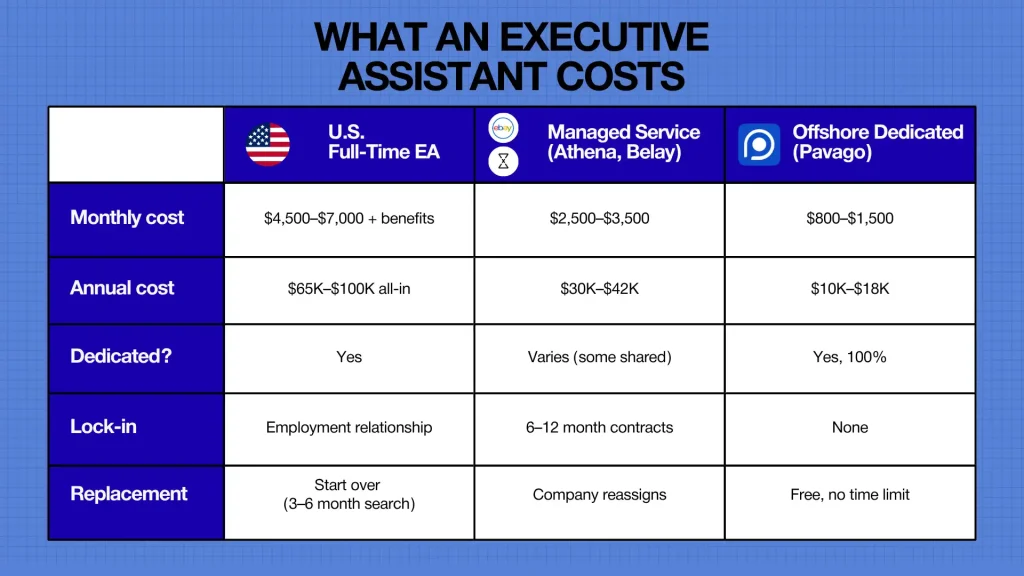
For a detailed cost breakdown, our guide to outsourced executive assistants covers pricing across all models.
Frequently Asked Questions
How much does it cost to hire an executive assistant?
U.S.: $65K–$100K/year. Managed services: $2,500–$3,500/month. Offshore dedicated through Pavago: $800–$1,500/month.
EA vs VA: What’s the difference?
VAs handle defined tasks. EAs anticipate needs, manage complexity, and act as the executive’s operational extension. EAs require stronger judgment, communication, and the ability to represent you in writing.
What skills should an EA have?
Calendar management, email triage, travel coordination, written communication, project tracking, stakeholder management, and proactive anticipation.
Can I hire an offshore EA?
Yes. EA work is communication-heavy and async-friendly. The key is vetting for written communication quality and anticipation, not just task completion. The Philippines, Pakistan, and LATAM all produce strong EA talent.
How long to hire?
Through Pavago: candidates in 1–2 weeks. Productive within 3–4 weeks total.
What tools should an EA know?
Google Workspace or Microsoft 365, Slack, Zoom, project management (Asana, Monday, ClickUp), travel booking, and CRM basics. Most tools are learnable in 1–2 days; judgment and communication are not.
Stop Hiring Task Followers. Start Hiring Anticipators.
The EA who changes your life isn’t the one who does what you ask. It’s the one who does what you would have asked if you’d had time to think of it. The 5-step process tests for exactly this: written communication, prioritization, anticipation, and live-system performance. Skip any step, and you’re hiring blind. Follow all five, and you’ll find the EA who gives you back 20+ hours a week.
Hire an Executive Assistant Through Pavago
EAs who handle the full client-facing spectrum: calendar, email, travel, projects, stakeholder communication. Screened for anticipation, not just task completion.
EAs from $800/month | Client-facing communication screened | Free replacements