Why Tech Support Is the Most Expensive Function to Keep In-House
Unlike customer service (which handles billing, orders, and general inquiries), tech support requires product knowledge AND technical troubleshooting skills. A tech support specialist needs to understand your product architecture, reproduce bugs, read error logs, test integrations, and escalate to engineering with actionable information instead of “the customer says it’s broken.”
That combination of product knowledge and technical skill is expensive domestically. According to the U.S. Bureau of Labor Statistics, the median annual wage for computer user support specialists was $59,660 in 2023, with the top quartile earning over $72,000. (external, dofollow, new tab) Add benefits and overhead, and you’re at $75K–$100K all-in for one tech support person.
At $1,500/month ($18K/year) for a dedicated Pavago tech support specialist handling both Tier 1 and Tier 2, the cost difference is 75–80%. Same tools. Same ticketing systems. Same product knowledge. Different labor market economics.
Tier 1 vs Tier 2: What Each Level Covers
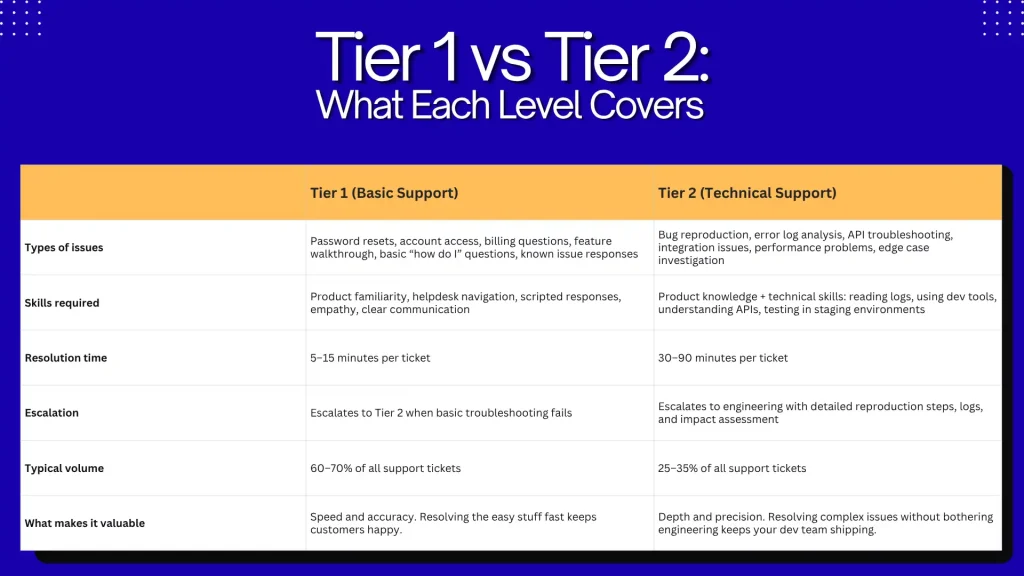
Most outsourcing providers handle Tier 1 only. They hire agents who follow scripts and escalate anything technical. Pavago places specialists who handle both Tier 1 and Tier 2. That means your engineering team only hears about issues that truly require code changes, not issues that a technically capable support person could have diagnosed and resolved.
The 3 Models for Outsourcing Tech Support
Model 1: BPO / Shared Agent Pool
How it works: A BPO company assigns agents to your account. Each agent handles tickets for 3–5 companies simultaneously. They follow your scripts and knowledge base.
Cost: $2,000–$5,000/month per agent slot. Or $8–25 per ticket/interaction.
Works for: High-volume Tier 1 support (200+ tickets/day). Call centers. Standardized products with limited technical complexity.
Breaks for: Technical products. The shared agent model means your agent is context-switching between your SaaS product and a retail returns queue. They don’t learn your product deeply because they’re not dedicated to it. Tier 2 is impossible in this model.
Model 2: U.S. In-House Tech Support
Cost: $4,000–$6,000/month + benefits per specialist. $55K–$85K all-in annually.
Works for: Companies with complex products that require deep institutional knowledge AND need someone on-site or in the same time zone for real-time collaboration with engineering.
Breaks for: SMBs. One U.S. tech support hire at $70K/year covers 40 hours per week. For the same budget, you get 3–4 dedicated offshore specialists covering multiple shifts or multiple product lines.
Model 3: Dedicated Offshore Specialist (Pavago)
Cost: $1,500/month. Full-time. Dedicated to your product.
Works for: SaaS companies, tech products, and any business where tech support tickets require product knowledge beyond what a script can provide. The specialist learns your product, your codebase (at a user level), your integrations, and your customer patterns. They handle Tier 1 AND Tier 2.
Breaks for: Companies needing 24/7 phone-based support with native U.S. English. For that, you need multiple specialists across time zones, or a hybrid model.
At Pavago, we place dedicated tech support specialists through our hire admin category. For customer service roles with less technical depth, see our customer service representative page.
What a Dedicated Tech Support Specialist Handles
| Task | What It Involves | Hours/Week | Tools |
|---|---|---|---|
| Ticket triage and resolution | Categorize incoming tickets by type and priority. Resolve Tier 1 immediately. Begin Tier 2 investigation within SLA. | 15–20 hours | Zendesk, Freshdesk, Intercom, Jira Service Management, HubSpot Service Hub |
| Bug reproduction | Follow customer-reported steps to reproduce bugs. Document reproduction steps, environment details, and expected vs actual behavior. | 3–5 hours | Browser dev tools, staging environments, Loom for recording, Jira |
| Knowledge base maintenance | Create and update help articles, FAQs, and troubleshooting guides based on recurring tickets. Reduce ticket volume over time. | 2–4 hours | Zendesk Guide, Freshdesk Knowledge Base, Notion, Confluence |
| Integration troubleshooting | Diagnose issues with API integrations, webhook failures, and third-party tool connections. Test in sandbox environments. | 2–4 hours | Postman, API documentation, staging environments, integration logs |
| Escalation management | Prepare detailed engineering escalation tickets with reproduction steps, logs, screenshots, and impact assessment. Follow up on resolution. | 2–3 hours | Jira, Linear, GitHub Issues, Slack |
| Customer communication | Respond to customers via email, chat, and occasionally phone. Explain technical issues in non-technical language. Set expectations on resolution timelines. | 5–8 hours | Helpdesk platform, email, Slack, Zoom |
| Reporting | Track ticket volume, resolution times, first-response times, CSAT scores, and ticket category trends. Report to leadership weekly. | 1–2 hours | Helpdesk analytics, Looker Studio, spreadsheets |
Total: 30–46 hours per week. A full-time role. According to Zendesk’s CX Trends Report, 72% of customers expect immediate service when contacting support, and companies with strong support operations see 5.7x higher revenue growth than competitors with poor support. (external, dofollow, new tab) Tech support quality directly impacts retention and revenue.
We’ve placed customer-facing support professionals for multiple clients. See the OPW Commercial Services case study for how we placed client-facing professionals who integrated into the team. For broader CS outsourcing, our outsource customer service guide covers all models, and our customer support outsourcing companies guide compares providers.
How to Vet a Tech Support Specialist
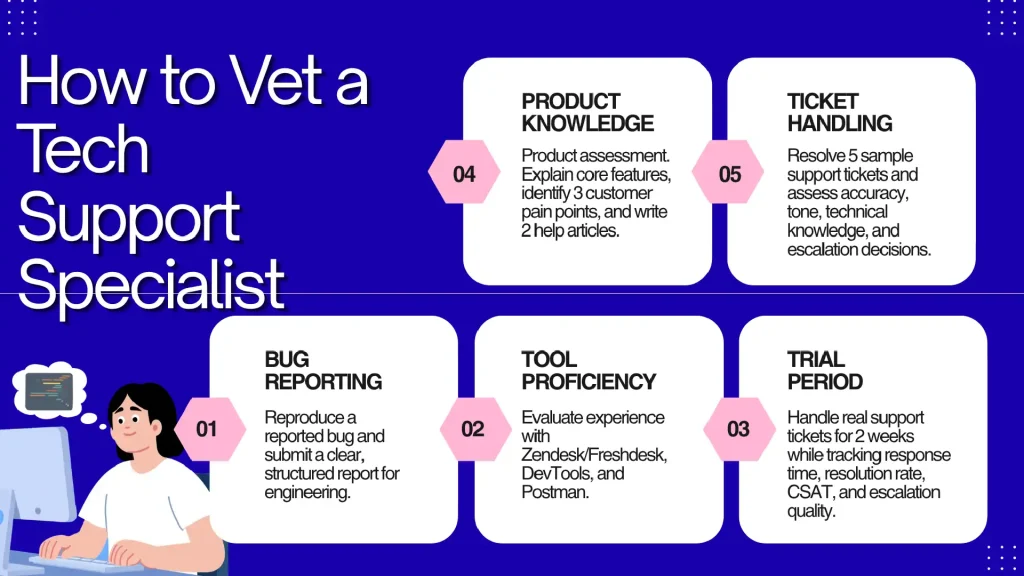
Step 1: Product walkthrough. Give them access to your product for 24 hours. Then ask them to explain the core features, identify 3 potential pain points a customer might have, and write 2 help articles. This tests: can they learn a product quickly? Can they see it from the customer’s perspective?
Step 2: Ticket simulation. Send them 5 sample tickets ranging from Tier 1 (“I can’t log in”) to Tier 2 (“Your API is returning a 500 error on this endpoint with this payload”). Evaluate: response accuracy, tone, technical depth, and whether they know when to escalate vs resolve.
Step 3: Bug reproduction exercise. Describe a bug report from a customer: “When I click export on a report with more than 1,000 rows, nothing happens.” Ask them to write the steps they’d take to reproduce, what information they’d collect, and how they’d document it for engineering. A-players produce a structured bug report. B-players forward the customer’s email to engineering.
Step 4: Tool check. Can they navigate Zendesk or Freshdesk? Can they use browser dev tools to check console errors? Can they use Postman to test an API endpoint? These are the tools of Tier 2 support. If they’ve never opened dev tools, they’re Tier 1 only.
Step 5: 2-week trial on real tickets. Route actual tickets to them. Track: first-response time, resolution time, CSAT scores, escalation rate (lower is better), and quality of engineering escalations (detailed and actionable vs vague). For structuring the trial, our customer service virtual assistant for SMBs guides covers CS-specific onboarding.
Cost Comparison
| U.S. In-House | BPO Shared Agent | Dedicated Specialist (Pavago) | |
|---|---|---|---|
| Monthly cost | $4,000–$6,000 + benefits | $2,000–$5,000 | $1,500 |
| Annual cost | $55K–$85K | $24K–$60K | $18,000 |
| Tier 1? | Yes | Yes | Yes |
| Tier 2? | Yes (if technically skilled) | Rarely (script-based only) | Yes (screened for technical troubleshooting) |
| Dedicated to your product? | Yes | No (shared across clients) | Yes, 100% |
| Cost per ticket (est 500 tickets/mo) | $8–12 | $4–10 (but quality trade-off) | $3 |
Frequently Asked Questions
How much does it cost to outsource tech support?
BPO shared agents: $2,000–$5,000/month. U.S. in-house: $4,000–$6,000/month + benefits. Dedicated offshore through Pavago: $1,500/month for Tier 1 + Tier 2.
Can outsourced tech support handle Tier 2?
BPO agents: usually not (they follow scripts). Pavago specialists: yes. We screen for technical troubleshooting skills, including browser dev tools, API testing, log analysis, and bug reproduction.
What helpdesk tools do they use?
Zendesk, Freshdesk, Intercom, Jira Service Management, and HubSpot Service Hub. The specialist works in YOUR system.
Will outsourced support hurt our CSAT scores?
BPO shared agents: possibly (they don’t know your product deeply). Dedicated specialists: no. Because they’re dedicated to your product, they build the same depth of knowledge as an in-house hire. CSAT typically improves because response times decrease with a dedicated person.
How do I handle 24/7 support with an offshore specialist?
One specialist covers one shift (8–10 hours). For 24/7 coverage, hire 2–3 specialists across different time zones. At $1,500/month each, that’s $4,500/month for round-the-clock Tier 1 + Tier 2 support. Less than one U.S. hire.
What about phone support?
Yes. The Philippines and Pakistan both produce specialists with strong English phone skills. For SaaS products, most support is email/chat, but phone is available when needed. For broader outsourcing options, our remote staffing agencies guide compares providers across functions.
The $45 Ticket or the $3 Ticket. Same Resolution. Different Model.
A U.S. tech support specialist resolving 500 tickets per month at $6,000/month = $12 per ticket. A dedicated Pavago specialist resolving the same 500 tickets at $1,500/month = $3 per ticket. Both use Zendesk. Both reproduce bugs. Both write knowledge base articles. Both escalate to engineering with actionable detail. The resolution is the same. The cost is 75% lower.
Outsource Tech Support Through Pavago
Dedicated tech support specialists. Tier 1 AND Tier 2. Zendesk, Freshdesk, Intercom, Jira. Bug reproduction, API troubleshooting, knowledge base maintenance. One person. Your product. Full-time.
Tech support specialists from $1,500/month | Tier 1 + Tier 2 | Free replacements